Share one dashboard with different views of the data
An analyst needs to work across regions. The East manager needs the invoices their team can act on. Gnok evaluates the published flow with the viewer’s permissions when they refresh the dashboard.
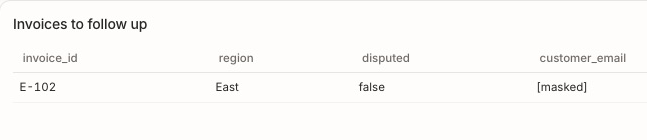
Filter the rows and mask the email
The analyst changes the flow to exclude disputed invoices. In v4, E-102 in East and W-201 in West still qualify. The manager’s East-only policy removes W-201 from their result. A separate mask hides the email on E-102.
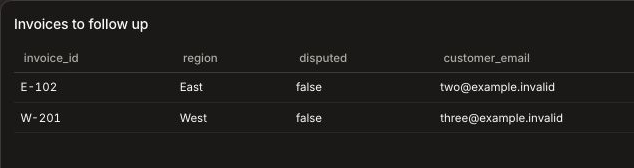
Grant and review access
Give the manager access to the dashboard, the chosen flow version, the connection and the underlying data through an appropriate role. An administrator can inspect grants and review policy changes in the audit log when investigating a change in access.
Manage workspace identities
Administrators use a password and a second factor, such as a passkey or an authenticator app. Teams can connect an identity provider using OIDC or SAML 2.0, and provision members and groups with SCIM.
Set a budget for language-model calls
Before a query can send review text to a language model, a workspace administrator sets the monthly token budget and approves the provider, model and operations. The rollout policy also records approval for data egress and retention.